MySQL
MySQL is an open-source (GPL licensed) relational database management system, where data are organized into one or more tables possibly related to each other according to a given structure.
Note
CryptoAC integrates with MySQL (v8.0+) for both RBAC and ABAC policies.
Role-based Access Control Integration with MySQL
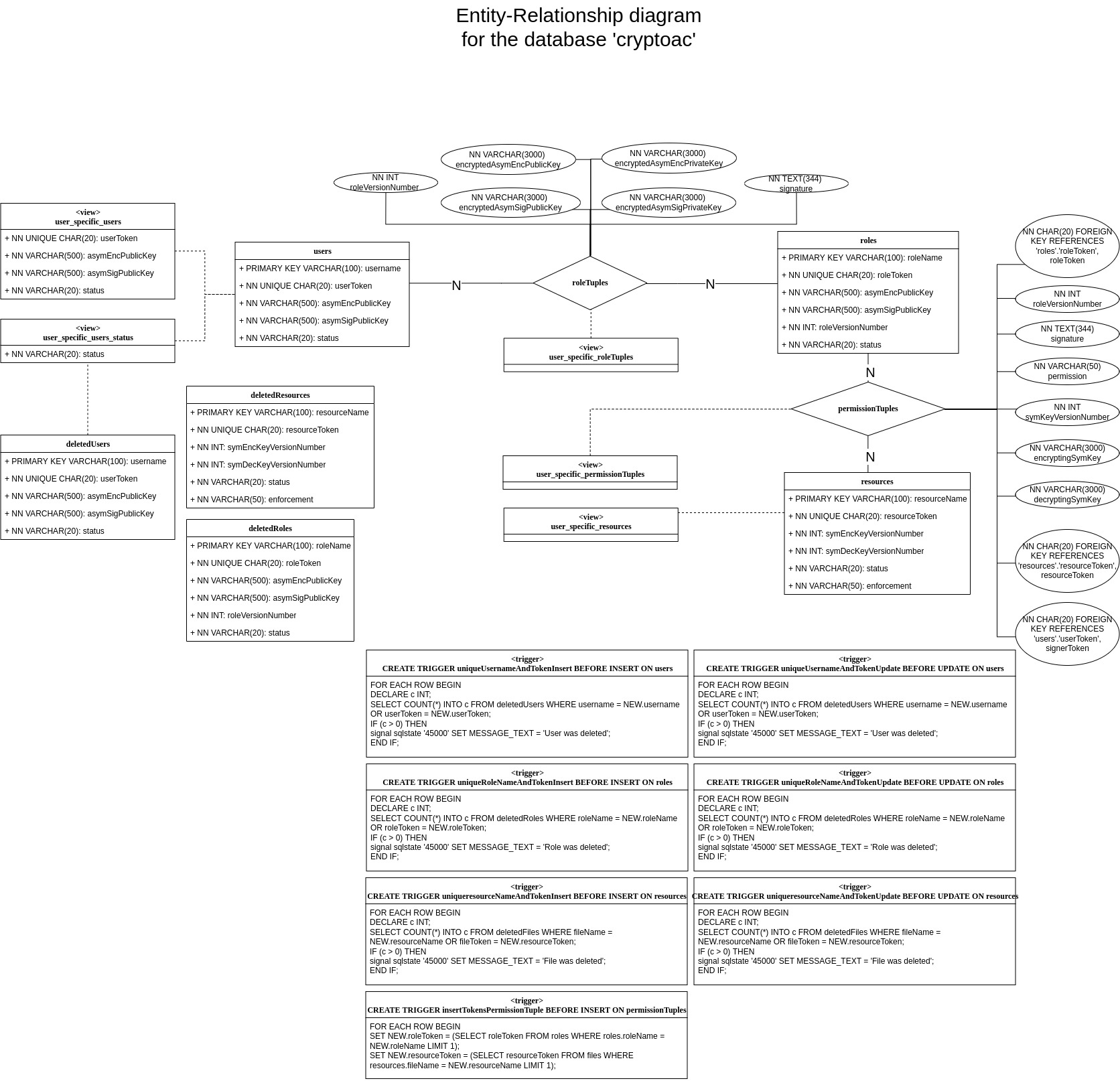
CryptoAC stores the metadata related to the status of the role-based cryptographic access control policy in a MySQL v8.0+ database with default name cryptoac. The administrator signs all metadata to guarantee their integrity.
We assign pseudonyms–random sequences of bytes–to users, roles and resources to hide (potentially sensitive) identifiers. Moreover, to avoid the disclosure of the whole cryptographic access control policy to the users in compliance with the need-to-know principle, we limit users’ query privileges by employing views and row-level permissions. In this way, each user knows her portion of the policy only.
To avoid stored-XSS attacks, all database inputs and outputs are sanitized through the PreparedStatement Java class and the OWASP Java Encoder, respectively. All encrypted values are converted in base64 before being stored in the database. Finally, users’ access to the database is protected by passwords.
Role-based Access Control Configuration for MySQL
To interact with the MySQL database, CryptoAC needs to know the endpoint (i.e., the URL and the port) on which the database is listening to connections and the client’s username and password; see the Core Profiles section for more details. Whenever the administrator adds a user to the policy, CryptoAC also creates the user’s account in the MySQL database and generates the user’s password. Intuitively, the database should have already been configured with an account for the administrator by using the initialization sql script below:
/**
 * What follows is related to the administrator of CryptoAC, and not to
 * the administrator of the database (which may be a separate user). Also,
 * remember to select a suitable password for the administrator of CryptoAC
 * and change the one below (i.e., `password`). Please leave the rest untouched.
 */
DROP USER IF EXISTS 'admin'@'%';
CREATE USER 'admin'@'%' IDENTIFIED BY 'password';
GRANT SELECT,INSERT,UPDATE,DELETE ON *.* TO 'admin'@'%' WITH GRANT OPTION;
GRANT REFERENCES ON *.* TO 'admin'@'%';
GRANT CREATE USER ON *.* TO 'admin'@'%';
GRANT CREATE VIEW ON *.* TO 'admin'@'%';
GRANT TRIGGER ON *.* TO 'admin'@'%';
GRANT CREATE ON *.* TO 'admin'@'%';
GRANT DROP ON *.* TO 'admin'@'%';
GRANT DELETE ON *.* TO 'admin'@'%';
GRANT SYSTEM_VARIABLES_ADMIN ON *.* TO 'admin'@'%';
FLUSH PRIVILEGES;
Then, at start-up, CryptoAC configures the database by creating the necessary tables, views and triggers, as shown in the graph below.
Warning
The secure deployment of MySQL is currently under development.
Attribute-based Access Control Integration with MySQL
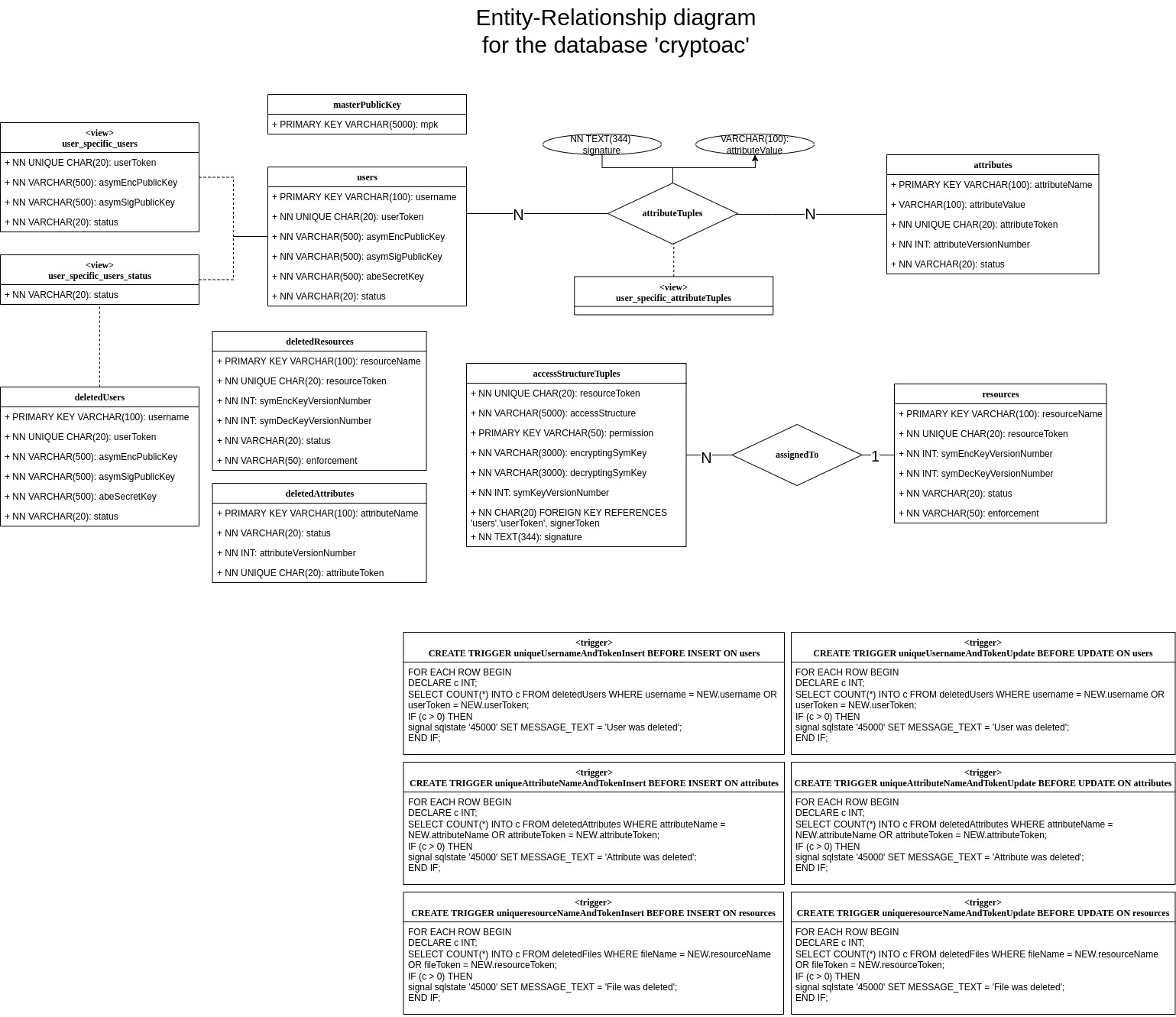
CryptoAC stores the metadata related to the status of the attribute-based cryptographic access control policy in a MySQL v8.0+ database with default name cryptoac. The administrator signs all metadata to guarantee their integrity.
To avoid the disclosure of the whole cryptographic access control policy to the users in compliance with the need-to-know principle, we limit users’ query privileges by employing views and row-level permissions. In this way, each user knows her portion of the policy only. Moreover, we assign pseudonyms–random sequences of bytes–to users, attributes and resources to hide (potentially sensitive) identifiers.
To avoid stored-XSS attacks, all database inputs and outputs are sanitized through the PreparedStatement Java class and the OWASP Java Encoder, respectively. All encrypted values are converted in base64 before being stored in the database. Finally, users’ access to the database is protected by passwords.
Attribute-based Access Control Configuration for MySQL
To interact with the MySQL database, CryptoAC needs to know the endpoint (i.e., the URL and the port) on which the database is listening to connections and the client’s username and password; see the Core Profiles section for more details. Whenever the administrator adds a user to the policy, CryptoAC also creates the user’s account in the MySQL database and generates the user’s password. Intuitively, the database should have already been configured with an account for the administrator by using the initialization sql script below:
/**
 * What follows is related to the administrator of CryptoAC, and not to
 * the administrator of the database (which may be a separate user). Also,
 * remember to select a suitable password for the administrator of CryptoAC
 * and change the one below (i.e., `password`). Please leave the rest untouched.
 */
DROP USER IF EXISTS 'admin'@'%';
CREATE USER 'admin'@'%' IDENTIFIED BY 'password';
GRANT SELECT,INSERT,UPDATE,DELETE ON *.* TO 'admin'@'%' WITH GRANT OPTION;
GRANT REFERENCES ON *.* TO 'admin'@'%';
GRANT CREATE USER ON *.* TO 'admin'@'%';
GRANT CREATE VIEW ON *.* TO 'admin'@'%';
GRANT TRIGGER ON *.* TO 'admin'@'%';
GRANT CREATE ON *.* TO 'admin'@'%';
GRANT DROP ON *.* TO 'admin'@'%';
GRANT DELETE ON *.* TO 'admin'@'%';
GRANT SYSTEM_VARIABLES_ADMIN ON *.* TO 'admin'@'%';
FLUSH PRIVILEGES;
Then, at start-up, CryptoAC configures the database by creating the necessary tables, views and triggers, as shown in the graph below.
Warning
The secure deployment of MySQL is currently under development.